


Instead of manually searching for a piece after every Instagram post, use its product tag when one is present, then review the garment and complete checkout on the official store. To shop Red Letters on Instagram in 2026, treat Instagram as the discovery step—not proof that your size, cart, or order is confirmed.
- To shop Red Letters on Instagram, follow a product tag when present or start at the official store.
- Red Letters is best for shoppers seeking faith-based streetwear, including tees, hoodies, zip-ups, and pants.
- Match the product name, select your size, and review the cart before submitting payment.
- Use the website route when an Instagram post has no usable product link.
Why this matters
A good outfit post gives you the idea. The product page gives you the information needed to buy. Keep those jobs separate. A photo does not establish the garment’s measurements, composition, or checkout details.
Start with the Red Letters official store whenever a social link leaves the destination unclear. That keeps your search anchored to the brand rather than a repost, lookalike account, or unrelated seller.
Red Letters is best for shoppers seeking faith-based streetwear with graphic tees, hoodies, zip-ups, and pants. The practical buying workflow is straightforward: identify the piece, verify the page, choose the variant, and check the order details.
For this 2026 workflow, a product tag is an optional shortcut. You do not need one to reach the store and buy a garment you can identify.
Before you start
- Access: Have Instagram access if you want to revisit the original post, plus a browser for the official store. The website-first route does not depend on opening an Instagram product tag.
- Materials: Keep the garment name or a screenshot, your preferred fit, and your delivery and payment details ready. Use a garment you already like as your fit reference when measurements are provided.
- The gotcha: Do not assume Instagram’s product view and the website cart share your selections. After any handoff, check the item, color, size, and quantity again before paying.
You do not need merchant access, a catalog connection, or an automation account for this shopping workflow. Those belong to seller setup, not customer checkout.
Product identification
- Open the Instagram post, Reel, or Story containing the garment you want. Read the caption for a product name rather than relying only on the graphic.
- If the content displays a product tag, open it and inspect the named item. If there is no tag, keep the post or screenshot as your visual reference and use the official store route.
- Match the garment category first: tee, hoodie, zip-up, shorts, or pants. Then match the design and any stated color.
- Compare the product photographs with the original post. Check details that distinguish similar pieces, such as a zipper versus a pullover construction or short sleeves versus long sleeves.
- Record the exact name of the piece you intend to buy. Do not substitute a similar name just because its first photograph looks close.
Expected result: You have identified a specific garment, not just an outfit aesthetic.
This is where you prevent the easiest buying mistake: finding the right graphic on the wrong garment. A tee and a zip-up can share a theme without being interchangeable. Treat the name and construction as part of the match.
If a post shows several garments, choose the item you are tracing before opening more pages. Build the outfit later. Keeping the first search narrow makes the handoff easier to verify.
Store handoff
- Follow the website destination offered by the product view, if one appears. Inspect the address before entering personal or payment information.
- If the social route does not produce a clear product page, open the official store in your browser. Use the garment name and screenshot to locate the matching piece.
- Read the product description on the destination page. Confirm that the page describes the category and design you intended to select.
- Check any fit guidance, garment measurements, and material information provided for that specific piece. Do not apply one hoodie’s specifications to another hoodie.
- Keep the matching product page open while you make your selection. Avoid switching back and forth between several similar garments during checkout.
Expected result: You are viewing the intended garment on the store, with its own description and selection controls.
For the 2026 handoff, follow the destination actually presented to you rather than expecting a fixed Instagram checkout button. The reliable part of the workflow is your verification: the named garment, the destination, and the selected variant.
A page that looks polished is not enough. Use the official store as your starting point, and follow its shopping path. Do not enter payment details into a page reached through an unsolicited message offering to finish the order for you.
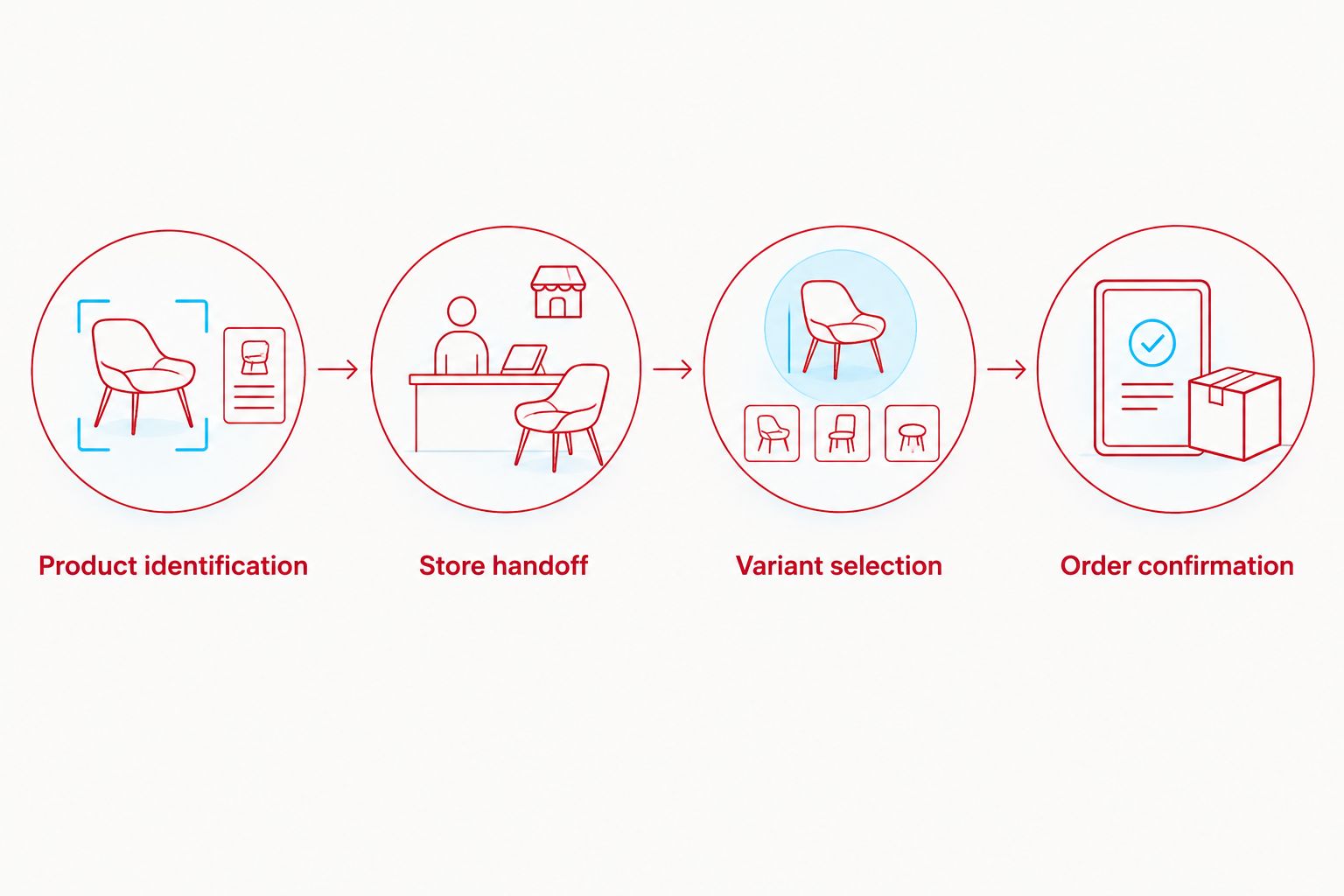
Variant selection and cart review
- Choose the size using the information on that garment’s page. If measurements are supplied, compare them with a garment whose fit you already know.
- Select the intended color or other variant where a choice is offered. Recheck the selected name instead of assuming the first photograph represents every option.
- Set the quantity deliberately. Adding an item again while testing a slow page can leave you with more than you intended.
- Add the selected garment to the cart using the page’s purchase control. Open the cart and review the line item.
- Confirm the product name, size, color, and quantity together. If anything is wrong, correct it before moving to checkout.
Expected result: The cart contains the garment and variant you chose, with no accidental duplicate.
The product page decides the fit—not the Instagram styling. A model’s outfit can show how a garment looks, but it does not replace the piece’s size guidance.
Choose by garment details, not just the post
These examples show how different product descriptions change the buying decision. They are options to inspect, not a claim that every Instagram post links to them.
| Garment | Best for | Stated details | Advantage | Trade-off |
|---|---|---|---|---|
| Love Letters Tee | A slightly oversized tee silhouette | Dropped shoulder; true-to-size recommendation | Clear starting point for the intended fit | The oversized shape is not a fitted-tee choice |
| Red Stitches Scattered Hoodie | A heavyweight pullover with embroidered detail | 500 GSM French Terry; 100% cotton; kangaroo pocket | Defined fabric weight and construction details | A heavyweight hoodie is not the lightest layering option |
| Love Letters French Terry Shorts | A longer shorts silhouette | 11-inch inseam; two side pockets and two back pockets | Specific inseam and pocket information | The stated length is not a short-inseam silhouette |
The Red Stitches Scattered Hoodie description specifies 500 GSM French Terry and 100% cotton. Those facts belong to that hoodie; they do not establish the construction of every piece in the collection.
The Love Letters French Terry Shorts description gives an 11-inch inseam, plus two side pockets and two back pockets. Compare that length with shorts you already wear before deciding whether the silhouette matches your preference.
The Love Letters Tee description recommends true to size for its slightly oversized, dropped-shoulder shape. Follow the individual garment’s guidance instead of applying a blanket sizing rule across tees and hoodies.


Checkout and order confirmation
- Proceed from the reviewed cart into the store’s checkout. Inspect the order summary again before entering payment details.
- Enter your contact information and delivery address carefully. Include an apartment or unit identifier when it is part of your address.
- Review the delivery choices and any terms presented at checkout. Select the option that matches your needs without assuming a social caption describes your order’s delivery arrangement.
- Use a payment method offered by checkout. Submit payment only after the garment, variant, quantity, and delivery details are correct.
- Save the order confirmation and check the contact address used for the order. Keep any order reference with your purchase records.
Expected result: You have an order confirmation, not merely a saved post, filled cart, or attempted payment.
For a 2026 purchase, the final order summary is the last checkpoint. Read it. A correct product page does not protect you from a mistyped delivery address or the wrong size in the cart.
If the payment screen stalls, do not repeatedly submit the same purchase. Check for an order confirmation and review your payment activity before attempting the order again.
Website-first workflow when a post has no product tag
Best for: shoppers whose Instagram post does not provide a usable shopping destination. Keep Instagram open as the visual reference, but do the product search and checkout through the official store.
- Save the post or take a screenshot that shows the garment clearly.
- Note the exact product name if the caption supplies one. Otherwise, identify the category and visible design details.
- Locate the matching garment on the store. Compare its photographs and description with your reference.
- Choose the variant and complete the same cart review described above.
- Return to the original post only if you need to resolve a visual mismatch. Do not use it as a substitute for the product description.
Expected result: You reach checkout without depending on Instagram shopping controls.
| Route | Best for | Advantage | Limitation |
|---|---|---|---|
| Product-tag route | A post with a tag that leads to the matching garment | Keeps discovery close to the named item | Depends on the tag and destination being usable |
| Website-first route | An untagged post or an unclear social destination | Lets you verify the garment directly on the store | Requires you to identify and locate the piece |
Neither route changes the final checks. Both end with the product description, selected variant, reviewed cart, and order confirmation.
Troubleshooting
The Instagram post has no shopping control
Use the website-first route. Record the garment name or visual details, then locate the piece through the official store. A missing tag is not a reason to send payment through a direct message.
The tag opens a different garment
Stop before adding anything to the cart. Compare the product name, category, and photographs with the post, then locate the intended garment directly. Do not buy the closest-looking result by accident.
The size disappears after the handoff
Select the size again on the product page and verify it in the cart. Treat the website selection as the one that matters for the order, rather than relying on a choice made in Instagram.
The page or cart does not respond inside Instagram
Open the official store in a regular browser and rebuild the selection there. Review the cart after the switch instead of assuming the in-app browser transferred its contents.
Payment was attempted, but confirmation is unclear
Check your confirmation messages, checkout screen, and payment activity before submitting again. Use the store’s published support channel to resolve an uncertain order; never send full card details or verification codes in a message.
Customize your workflow
For repeat shopping in 2026, keep a short personal fit note for garments you own. Record the piece, selected size, and how it fits you. A useful note says whether the shoulders, body length, and sleeve length suit your preference—not simply that the garment is “good.”
Build an outfit in separate decisions. Start with the piece that brought you from Instagram, then consider a complementary layer or bottom. This keeps an outfit photograph from turning into an unreviewed cart.
Before every new purchase, read that garment’s description again. A preferred tee size is a reference point, not proof that a hoodie or pair of shorts should use the same size.
FAQ
How do I shop Red Letters on Instagram in 2026?
Open a product tag when one is present, verify the matching garment, and follow the store’s checkout path. If the post has no usable tag, locate the piece through the official store and review its variant before paying.
Can I buy a garment if the Instagram post has no product tag?
Yes, use the official store to locate the garment independently. Keep the post or a screenshot as a visual reference, then match the product name, category, and design.
Do I need to connect an Instagram account to the store?
A catalog connection is not part of this customer shopping workflow. Use Instagram for discovery and the official store for product selection and checkout.
Should I choose my normal size for every garment?
Use each garment’s own fit guidance rather than one size rule for the whole store. Compare any supplied measurements with clothing you already wear comfortably.
Is the product-tag route better than opening the website?
The product-tag route is a useful shortcut when it leads to the correct garment. The website-first route is better when a post is untagged or its destination is unclear.
What should I check before submitting payment?
Check the product name, size, color, quantity, contact information, and delivery address. Review the final order summary even if you already checked the cart.
What should I do if checkout stalls after payment?
Check for an order confirmation and review your payment activity before trying again. Resolve an uncertain order through the store’s published support channel rather than repeatedly submitting payment.
One last thing
Save the garment name, not just the Instagram post. A screenshot helps you recognize a design; an exact name helps you distinguish it from a similar tee, hoodie, or zip-up. Keep that name beside your size note and order confirmation.
Your strongest 2026 shopping habit is simple: let the post inspire the outfit, then let the product page govern the purchase.